If you are looking for an image editing program that meets the highest standards and is also free, then Pixlr is the right alternative to the paid programs.
Pixlr lets you edit images directly in your browser. There are now many image editing tools
It can be used like Photoshop
Online registration is not required
It's 100% free
It can be used everywhere
There are numerous free tutorials and an active community for help, inspiration, and support.
-> Simply upload your image and get started!
While its range of functions cannot compete with Photoshop, it easily surpasses most photo tools in Web 2.0.
On the website, you can edit your photos directly in the browser according to your wishes and then save them to your computer.
Although the website is in English, all image editing functions are displayed and explained in German. You don't even need to register to use the extensive features. Your images remain on your own PC during editing; they are only loaded into the image editing program's browser.
Pixlr E Tool (formerly Pixlr Editor), Pixlr X (formerly Pixlr Express), and the newer Pixlr Bg all run conveniently directly in the browser and are completely cloud-based . There's no need to download or install anything locally, and you can get started immediately.
The express version is also available in Apple's App Store ( link to the iPhone app ) and on Google Play for Android-based smartphones ( link to the Android app ). The only drawback of the browser version is that your internet connection must be stable if you need to finalize the graphics for your presentation .
Three options – Pixlr E, Pixlr X and Pixlr Bg
On the Pixlr.com you have three options for free image editing:
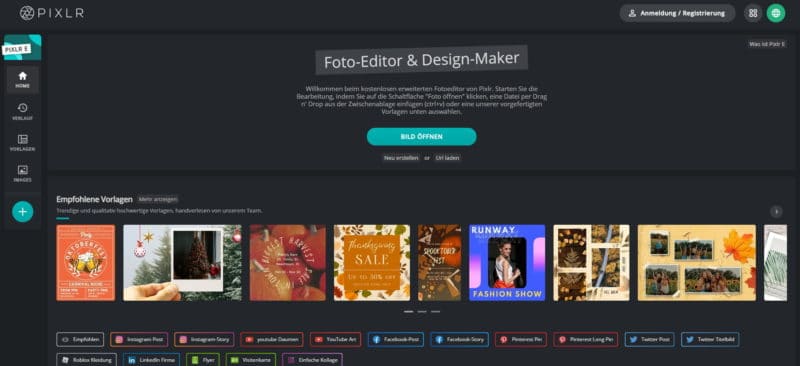
Pixlr E
Pixlr E – Free Photo Editor and Design Maker
The Photo Editor & Design Maker offers you the complete program, which is equipped with a German menu navigation.
The E version is a free and advanced online photo editor with extensive features. With the app, you can edit and transform photos and templates directly in your browser and even open Photoshop files online.
Make even more creative/complex edits in fewer steps with advanced tools and features like AI CutOut, filters (Glitch and others), design templates, designer fonts, frame tool, gradient text, double exposure, photo collages and more.
The program supports editing most common image formats; you can edit JPEG, PNG, WEBP, GIF, and PSD (Photoshop images). However, you cannot edit video files or animated GIFs.
Work in layers, replace colors, adjust brush presets, transform objects, apply filters and effects directly from your browser to have full control over your image results.
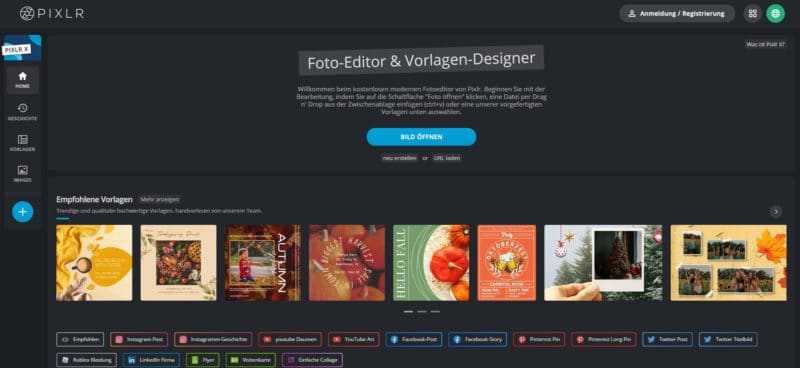
Pixlr X
Pixlr X – Free Online Photo Editor and Template Designer
Another tool (somewhat lighter and more streamlined than the E version) with many helpful photo editing . Self-explanatory icons guide you through the image editing process. The following functions and applications are available:
Easy cropping, resizing, and rotating of images
Auto Fix “Photos: Balance colors with one click and adjust dark photos taken in poor lighting conditions”
Remove red eyes and whiten teeth with simple tools
Use overlays to change the mood of an image – enhance the color tone or add surreal shading
Use lighting effects for drama or to add a grunge look. Control the effects with simple adjustments to the intensity and direction of each effect
From the wide variety of edges – choose a style that suits you
Work like a pro with cool photo effects like blur, denoise, and more
Discover color tools to change contrast and brighten photos
Use Favorites to keep track of your favorite effects and overlays
Share your photo via Facebook or email, or simply save it to your library…
Create stunning YouTube thumbnails, Instagram stories, Facebook posts, Roblox clothing, and more with professionally designed templates. No design experience required.
Create your masterpiece with one-click tools and features like AI CutOut, Glitch Studio, filters and effects, text styles and presets such as overlays, borders, shapes & stickers.
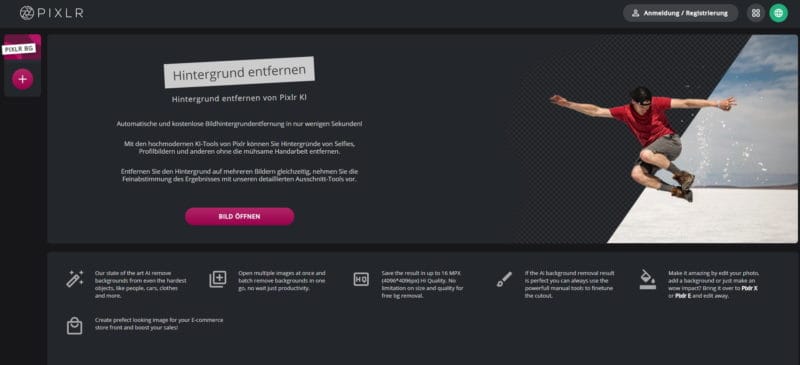
Pixlr Bg
Online background removal and cutout with Pixlr AI
A truly helpful new tool has been added for intelligently and quickly removing backgrounds. Isolating objects has never been easier.
Backgrounds are removed using the proprietary artificial intelligence Pixlr AI. Automatic and free background removal in just a few seconds.
state-of-the-art AI tools let you remove backgrounds from selfies, profile pictures, and more without tedious manual work. You can even remove the background from multiple images simultaneously, if needed. Then, you can fine-tune the result with detailed cropping tools.
Useful tools and helpful functions
Additional editing options with effects were formerly offered by the O-Matic tool , but this is probably no longer available.
In detail, the programs offer all the functions needed for image editing. The free image editor opens and saves formats such as JPEG, PNG, and BMP, as well as GIF and Photoshop files.
The toolbox contains everything needed for professional image editing. Whether for painting or cropping, post-processing or isolating, nothing is missing from the tool palette, including eraser, text and distortion tools.
Shortcuts are available for all relevant menu items and tools . You can use the program to distort, transform, or mirror .
A history function helps you if you want to correct work steps or undo them step by step.
The free image editing software also includes color and contrast adjustments in numerous levels .
Automatic tone correction and around 30 filters are further aids for perfect image editing.
as a smartphone app . Before sharing your photos on a social network, you can use the tool to give them the finishing touch. It can even make teeth appear whiter, while significantly improving denoise and sharpening
If you don't want to learn this great image editing tool completely without prior knowledge, we recommend the following resources for tutorials, instructions and tips:
Owner and Managing Director of Kunstplaza . Publicist, editor, and passionate blogger in the fields of art, design, and creativity since 2011. Graduated with a degree in web design from university (2008). Further developed creative techniques through courses in freehand drawing, expressive painting, and theatre/acting. Profound knowledge of the art market gained through years of journalistic research and numerous collaborations with key players and institutions in the arts and culture sector.
Regardless of your field of activity as a web designer, graphic designer, game developer, photographer, programmer, product designer, journalist, content creator or influencer , as a self-employed person you have a wide range of tasks to manage.
From customer acquisition and successful project implementation to time management and financial administration – including the often unpopular tax matters.
Good information and the right online tools are crucial for a successful career as a freelancer or content creator.
In this section you will find helpful articles and valuable advice with tips specifically for freelancers.
We use technologies such as cookies to store and/or access device information. We do this to improve your browsing experience and to display (non-)personalized advertising. If you consent to these technologies, we can process data such as browsing behavior or unique IDs on this website. Refusal or withdrawal of consent may adversely affect certain features and functions.
Functional
Always Active
Technical storage or access is strictly necessary for the legitimate purpose of enabling the use of a specific service expressly requested by the subscriber or user, or for the sole purpose of carrying out the transmission of a message over an electronic communications network.
Preferences
The technical storage or access is necessary for the legitimate purpose of storing preferences that were not requested by the subscriber or user.
statistics
Technical storage or access that is solely for statistical purposes.Technical storage or access that is used solely for anonymous statistical purposes. Without a subpoena, the voluntary consent of your internet service provider, or additional recording by third parties, the information stored or retrieved for this purpose cannot generally be used to identify you.
marketing
Technical storage or access is required to create user profiles, to send advertising, or to track the user on one or more websites for similar marketing purposes.








 J-Line Large Cushion with Knitted Surface, Cotton (White-Red)
42,90 €
J-Line Large Cushion with Knitted Surface, Cotton (White-Red)
42,90 €