AI logo generators are not only cost-effective but also impressively fast. These AI logo generators present numerous design variations within a very short time, with response times of under 5 minutes. Additionally, most AI logo tools offer a free or trial version, making it particularly easy to get started.
However, a logo is one of the central elements of your brand identity, which is why the right approach is crucial. In this professional guide , you'll learn how to create a compelling logo using AI logo design tools like Turbologo, Midjourney, DALL-E, and others. You'll also learn about the challenges you might encounter—for example, when integrating text into your designs.
Preparation: What you should know before using AI in your logo
Before you design your logo with artificial intelligence, you should make some basic preparations. Just like in the classic design process, the first step is identical to the AI Logo : Creating a solid basis so that the AI can provide the corresponding results to its ideas.
Define brand goals and target audience
A logo is far more than just a visual symbol – it's the face of your brand and often the first impression potential customers have of your company. Therefore, you should first clearly define your brand values. Ask yourself the following questions:
What is the logo meant to express?
Who is the logo intended to appeal to?
What emotions should your logo evoke?
How do you differentiate yourself from your competitors?
The answers to these questions form the foundation for all further decisions in logo creation. A precise and targeted briefing is particularly important, as AI systems need this information to generate relevant and valuable results. Keep in mind that the quality of the result depends heavily on the accuracy of your briefing – the clearer your instructions, the better the logo will be.
Understanding logo types and styles
Before using AI logo generators, you should familiarize yourself with the different logo types and their applications. Each style has its own strengths and is suitable for different industries:
Minimalist : Clean lines, few details (ideal for tech companies)
Furthermore, you should consider whether your logo should be purely text-based or if it can include an image or symbol. Collect 5-10 logos that you like – not to copy, but to analyze. What makes these designs stand out? Which elements might be suitable for your brand?
Select colors, symbols, and fonts
Color psychology plays a crucial role in branding. Colors influence our perception and emotions, even if we aren't always aware of it. Therefore, choose a color palette that suits your industry and target audience. For example, blue conveys trust and reliability, while yellow stands for optimism.
An important rule of thumb for logo color combinations is: less is more. Experts recommend sticking to two- or three-color combinations , or even choosing a single-color logo. Too many colors make the logo less clear and recognizable.
When choosing a font, it's important to remember that almost every logo contains text in addition to a graphic element – some logos even consist entirely of text. The typography should match the brand identity and be legible. For example, an organic font harmonizes well with artistic, hand-drawn elements, while a modern sans-serif font is a better fit for a minimalist logo.
Finally, you should also pay attention to the technical aspects: A good logo must work in different sizes and be recognizable on various media. While AI logo generators offer many possibilities, your preparation is the key to a successful result when creating a logo with AI .
Why logos need to have a different effect depending on the industry
Not every industry speaks the same visual language. A logo that works for a tech brand often won't suit a company in healthcare or construction. Modern AI logo generators now allow for the rapid creation of designs – but the difference lies in their proper application. Those who know their industry and clearly define what's important will achieve compelling results.
Visual design fulfills not only aesthetic but also functional tasks. A logo should build trust, convey professionalism, and stand out in the market. However, these requirements differ in every industry.
A lawyer needs clarity and authority, while a cosmetics brand conveys elegance and emotion. Colors, fonts, shapes – they all create associations. Anyone wanting an industry-appropriate logo should strategically manage these associations.
How AI tools process design logic and industry data
AI logo generators are based on training data that analyzes typical design behavior. They recognize trends, combine colors, typography, and symbols – and generate suggestions that match the input industry.
User input is crucial: the more specific the information, such as industry, style, target group, or brand values, the more precise and relevant the result. AI is not a replacement for brand awareness, but it is an accelerator for the creative process.
What matters when choosing an industry for a generator
Selecting the right category (e.g., technology, fashion, construction, medicine)
Customizing the tone: modern, classic, luxurious or minimalist
Consideration of industry-specific color and shape preferences
Integration of relevant symbols or icons
Comparison with real market participants to avoid similarity
AI generators usually produce many variations. The crucial point is to selectively choose those that reflect the desired brand image. Comparing these with established players is helpful – not to copy them, but to consciously create differentiation.
Typical industries and their design requirements
A tech company relies on modern fonts, geometric shapes, and digital colors like blue or turquoise. Clarity, innovation, and a future-oriented approach dominate here. A healthcare provider, on the other hand, works with soft shapes, calming colors, and a sense of security.
In the creative industry, more unconventional designs are acceptable – unconventional typography or bold contrasts are perfectly acceptable. A construction company, on the other hand, needs a solid, straightforward image that exudes stability. The crucial point is: it's not the most beautiful design that wins, but the one that suits the target audience and the business sector.
Creating a logo with AI: The creative process
How to create a logo with AI: A professional guide for creatives. This image is for illustrative purposes and was created using image AI.
After thorough preparation, the exciting part begins – the creative process of creating a logo with AI . Unlike traditional design methods, here you work hand in hand with artificial intelligence. This collaboration requires both creative thinking and technical understanding to get the most out of the AI tools.
1. Brainstorming and mood board
Brainstorming is essential before using an AI tool for the first time . Find inspiration in existing logos within your industry, paying attention to their colors, typography, and symbols. Browse books, magazines, local shops, and online platforms like Pinterest—inspiration is everywhere.
A mood board helps you visually structure your thoughts. Essentially, it's a collage of images, textures, typography, color palettes, and descriptive words. With a mood board, you can:
Gather ideas and inspiration for your logo
To depict moods and feelings that are difficult to put into words
Define the visual direction of your logo
Tools like Canva or Adobe Express are excellent for creating digital mood boards. Alternatively, you can use AI mood board generators like MyMap.AI, which automatically create professional mood boards from text descriptions.
2. Formulate prompts for AI tools
The key to the successful AI Logo Design lies in the wording of precise prompt-the instructions that you give to the AI tool. These entries guide the AI image generator based on your specifications of logo design options.
An effective prompt structure includes the following elements, separated by commas:
Logo type (pictorial mark, emblem, word mark)
Motif or main element (keyboard, coffee cup)
Style (Pop Art, Minimalist, Vintage)
Technique (line drawing, gradient, 3D)
Color palette (blue tones, pastel colors)
Additional details or exclusions (no text, no people)
Example of a well-structured prompt: “Minimalist line logo of a bird, vector-based, geometric, simple lines, in shades of blue, without text”
Keep in mind that most AI tools like Midjourney, DALL-E, or Canva take AI input very literally. If you want to change specific elements, you must explicitly mention this in your prompt.
These ChatGPT Prompting tips from the AI Content Club will help you become a more creative and faster designer:
3. Iterative work with AI generators
The process of creating a logo with AI is rarely completed on the first try. Rather, it is an iterative process of discovery and refinement. After the initial generation of logo options, the real creative work begins.
When working iteratively, you should:
Try different variations of your prompts
Combine elements from different generated logos
Refine the results step by step by adjusting the text specifications
Experimenting with different styles, colors, and compositions
This process requires patience and repeated experimentation. Consider the initial drafts as a starting point, not the final result. With each iteration, you'll get closer to your ideal logo.
Remember that AI tools like ChatGPT or Midjourney serve as interactive tools for your creative brainstorming. Critically evaluate which generated designs best suit your brand and leverage the strengths of AI without relying on it entirely.
In the next phase, we will examine the best available tools for creating artificial intelligence logos and compare their specific strengths and weaknesses.
The best tools for AI logo design at a glance
The landscape of AI logo generators is diverse and constantly growing. Below, we present the most powerful tools that allow you to create professional logos – without extensive design knowledge.
Looka
Looka uses artificial intelligence to generate a unique logo in minutes. The process begins with you entering your company name and selecting a few design styles you like. Looka then analyzes your preferences and creates suitable logo suggestions.
A particularly noteworthy feature is the ability to download your logo in various formats, making it ready for all applications – from your website to business cards and social media. Prices start at around €20 for a simple PNG logo. For more comprehensive options, including vector files and unlimited revisions, Looka offers a Brand Kit for €96 per year.
Turbo logo
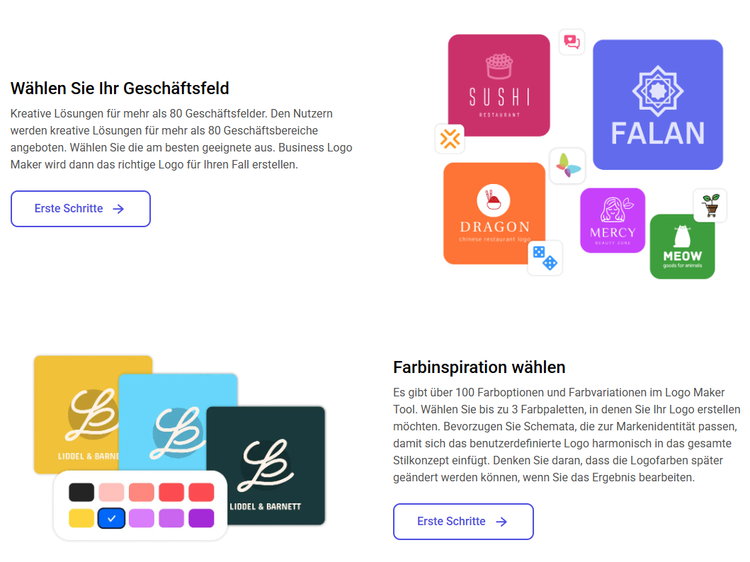
Turbologo is a leading AI logo generator that helps you create unique logos from thousands of categories. The intuitive software offers an optimal user experience, delivering results quickly and easily.
Turbologo makes logo creation very easy with customizable templates.
Quickly create custom logos and adjust colors, symbols, and sizes. Visualize your logo on various materials. Receive high-resolution file formats (SVG, PNG, PDF) with color and transparent versions.
LogoAI
LogoAI is an AI-powered platform that creates professional and elegant logos in just a few clicks. The tool understands design trends and suggests visually appealing layouts tailored to your industry.
A standout feature of LogoAI is its automation of branded content creation and customization. The platform allows you to quickly and efficiently generate brand-compliant content. It offers three pricing plans: Basic (€27.67), Pro (€56.30), and Brand (€94.47), the latter of which even includes logo animations and a Brand Center.
DesignEvo
DesignEvo stands out with its impressive library of over 10,000 pre-made logos and millions of icons. The tool offers a wide variety of fonts, customizable colors, and a gradient builder.
DesignEvo's strength lies in its user-friendliness – thanks to its easy-to-navigate interface and drag-and-drop functionality, no prior design knowledge is required. There's a free option for simple logos, as well as paid plans starting at €24.99. However, it's important to note that the free plan limits downloads to the PNG format; for other formats like SVG, an upgrade is required.
Midjourney & DALL-E
Midjourney and DALL-E are powerful AI image generators that can also be used for logo design. While not specifically designed for logos, they offer unparalleled creative possibilities.
Important note: Midjourney doesn't handle text well. Therefore, for a complete logo, you'll need to use tools like Illustrator or Canva to add text or refine your designs. It's recommended to use a "white background" and "vector" in your prompts to create a logo that's easy to isolate.
With DALL-E, you can use similar prompts as with Midjourney. Try inputs like “vector graphic logo of fox, simple minimal” or “minimal line logo of a flower, vector” .
Canva & ChatGPT combination
Canva's Dream Lab , powered by Leonardo.AI , is an AI logo generator that can capture the essence of your brand. With AI-driven, user-friendly text prompts, Dream Lab transforms written information into detailed logos.
For even better results, you can combine ChatGPT with Canva. While some may find the integration unconvincing, this combination can still be useful: Use ChatGPT to gather information about your preferences and requirements, and then use that information to create better prompts for Canva.
Another advantage of Canva is that you can edit your AI-generated logo with the free photo editor to strengthen brand loyalty – without having to switch apps. The basic version is free to use, while Pro subscribers can unlock additional features.
Each of these tools has its own strengths and is suitable for different needs. Try out different options to find out which tool best suits your AI logo design project .
Tips for optimization and post-processing
The path to a professional logo doesn't end with the first AI-generated design. Most AI logos aren't optimized for practical use and require post-processing. Only this final polish transforms your AI logo design into a high-quality, ready-to-use brand identity.
Fine-tuning with vector programs
AI generators typically produce logos as simple, low-resolution raster graphics (PNG, JPG) that are unsuitable for professional applications. Manual vectorization is therefore essential. Vector images consist of geometric shapes and can be scaled to any size without loss of quality.
While raster graphics pixelatedvector graphics can be easily edited in programs like Illustrator or the free Inkscape. Vectorization also optimizes paths – particularly important for applications such as vinyl stickers or lettering.
Add text and slogan
Many AI tools, such as Midjourney, struggle with text. Therefore, creating a complete logo often requires additional software to add text or refine your designs. The font plays a crucial role in defining the logo's character – is it playful, serious, modern, or classic?
Ensure your typography aligns with your brand while remaining easily legible. While AI generators often suggest suitable fonts, they lack the knack for truly unique typefaces. For bespoke typographic solutions, human expertise is sometimes essential.
Check scalability and readability
Every AI logo should be thoroughly checked before final use. Here's a short checklist:
Favicon test : Reduce your logo to 16x16 pixels – is it still recognizable? If so, it works in almost all applications.
Color consistency : Are the colors identical in different output formats?
Font quality : Are all letters clearly legible and professionally set?
Symbolism : Could the design be misunderstood in other cultures?
Uniqueness : Use reverse image search to find similarities.
Remember that a professional logo must work in both RGB (for digital media) and CMYK (for print). With some targeted fine-tuning, you can ensure that your AI-generated logo not only looks good but also functions flawlessly.
What you need to know legally
The legal aspects of AI-generated logo design are often overlooked, but they are crucial for the long-term success of your brand. Before using an AI-generated logo, you should understand the legal framework to avoid problems later on.
Usage rights and licensing models
Whether you are allowed to use an AI logo commercially depends on the terms of service of the respective tool. For example, Looka's Terms & Conditions : “In order to download and/or use your End Products outside of the Site, whether for commercial or personal use, you must pay the Fee stated on the Site .” Only after purchasing a paid account are you permitted to use the logo privately or commercially.
Other providers, such as OpenAI, generally permit the commercial use of their DALL-E images – regardless of whether you use the free or paid version. However, almost all AI platforms disclaim liability for legal issues. Midjourney's terms of service even state: “You are responsible for your use of the service. If you harm someone else or get into a dispute with someone else, we will not be involved .
Why AI logos are not protected by copyright
Under German law, according to §2 of the Copyright Act (UrhG), a logo must constitute a personal intellectual creation to enjoy copyright protection. Simply entering text into a prompt does not make you the author, as you are not involved in the creative process. AI itself cannot be the author either, since under German law only humans qualify as such.
The consequences are far-reaching: Without copyright protection, anyone can copy and use your logo. Furthermore, it's impossible to acquire usage rights for AI-generated images that would prevent third parties from using them.
Recommendation: Register your logo
Despite the lack of copyright protection, AI logos can be registered as trademarks. Unlike copyright, the origin of a logo is not crucial for trademark registration. The only requirement is that the mark is distinguishable from other trademarks.
Before registering with the German Patent and Trademark Office (DPMA), you should definitely conduct a thorough trademark search . Especially with AI-generated logos, there is a risk that they will be too similar to existing trademarks, as AI systems are based on existing designs.
The safest strategy is to customize the AI-generated logo and document these changes. This reduces the risk of legal warnings for copyright infringement and increases the chances of successful trademark registration.
The future path to a professional logo with AI
Creating a logo using artificial intelligence undoubtedly represents a revolution in the design field. Cost-effective, fast, and accessible – these advantages make AI logo generators an attractive alternative for entrepreneurs, startups, and creatives. However, the process requires more than just a few clicks.
Your preparation forms the foundation of a successful AI logo design. Clear brand goals, defined target groups, and well-thought-out style choices contribute significantly to the final result. Crucially, the more precise your prompts, the better the generated results.
The creative process itself evolves into a collaboration between humans and machines. You provide the vision, while the AI handles the technical implementation. Through iterative work, you gradually refine the result until it meets your expectations.
Choosing the right tool depends primarily on your specific requirements. While Looka and LogoAI are particularly user-friendly, Midjourney and DALL-E unparalleled creative possibilities – albeit with limitations in text integration.
Please note: The AI-generated logo is often just the starting point. Post-processing, especially vectorization and typographic adjustments, transforms a simple design into a professional trademark. These optimizations ensure that your logo works flawlessly on all media and at any size.
From a legal perspective, despite the lack of copyright protection for AI creations, you should register your logo as a trademark. This step offers at least some legal protection for your visual identity.
AI logo design ultimately doesn't replace human creativity, but rather enhances it. The technology allows you to create faster and more cost-effectively, while you, as a human, retain artistic direction and critical judgment. At the same time, you should respect the limitations of current AI technology and know when human intervention is necessary.
Equipped with this knowledge, you can now confidently dive into the world of AI logo design and create the perfect visual identity for your brand – without having to spend a fortune or bring years of design experience.
Owner and Managing Director of Kunstplaza . Publicist, editor, and passionate blogger in the fields of art, design, and creativity since 2011. Graduated with a degree in web design from university (2008). Further developed creative techniques through courses in freehand drawing, expressive painting, and theatre/acting. Profound knowledge of the art market gained through years of journalistic research and numerous collaborations with key players and institutions in the arts and culture sector.
Regardless of your field of activity as a web designer, graphic designer, game developer, photographer, programmer, product designer, journalist, content creator or influencer , as a self-employed person you have a wide range of tasks to manage.
From customer acquisition and successful project implementation to time management and financial administration – including the often unpopular tax matters.
Good information and the right online tools are crucial for a successful career as a freelancer or content creator.
In this section you will find helpful articles and valuable advice with tips specifically for freelancers.
We use technologies such as cookies to store and/or access device information. We do this to improve your browsing experience and to display (non-)personalized advertising. If you consent to these technologies, we can process data such as browsing behavior or unique IDs on this website. Refusal or withdrawal of consent may adversely affect certain features and functions.
Functional
Always Active
Technical storage or access is strictly necessary for the legitimate purpose of enabling the use of a specific service expressly requested by the subscriber or user, or for the sole purpose of carrying out the transmission of a message over an electronic communications network.
Preferences
The technical storage or access is necessary for the legitimate purpose of storing preferences that were not requested by the subscriber or user.
statistics
Technical storage or access that is solely for statistical purposes.Technical storage or access that is used solely for anonymous statistical purposes. Without a subpoena, the voluntary consent of your internet service provider, or additional recording by third parties, the information stored or retrieved for this purpose cannot generally be used to identify you.
marketing
Technical storage or access is required to create user profiles, to send advertising, or to track the user on one or more websites for similar marketing purposes.



 Square 3D wall relief "Graphic", metal object with matte finish and branch motif
189,00 €
Square 3D wall relief "Graphic", metal object with matte finish and branch motif
189,00 €


