The world of e-commerce is growing rapidly, and with it, the demand for innovative, customizable solutions. Shopware, a leading e-commerce platform in Germany and beyond, offers freelancers an ideal opportunityto expand their technical skills while making a significant contribution to the digital commerce landscape.
Numerous online shops in the art sector also rely on this solution.
Plugins are extensions that expand the functionality of a shop. Whether it's special payment methods, marketing features , or logistics solutions – the possibilities are virtually limitless.
Companies are constantly looking for new and better ways to optimize their shops and increase sales. This is where talented developers come in.
Career opportunity for freelancers: Developing Shopware plugins. Photo by Chen @chen93, via Unsplash
Requirements and opportunities
Developing Shopware plugins requires comprehensive knowledge of PHP and MySQL. Experience with Symfony, which serves as the foundation for Shopware, is also advantageous. Furthermore, knowledge of HTML, CSS, and JavaScript is necessary to customize the frontend to meet specific requirements.
Working as a freelancer offers the opportunity to work flexibly and choose projects according to your strengths and interests. You have the freedom to work on a variety of projects, expand your client base, and establish yourself as an expert in your field.
Why Shopware in particular?
In the e-commerce sector , choosing the right platform is key to the success of an online shop . Shopware stands out, particularly in Germany and Europe, for its adaptability, scalability, and strong community support.
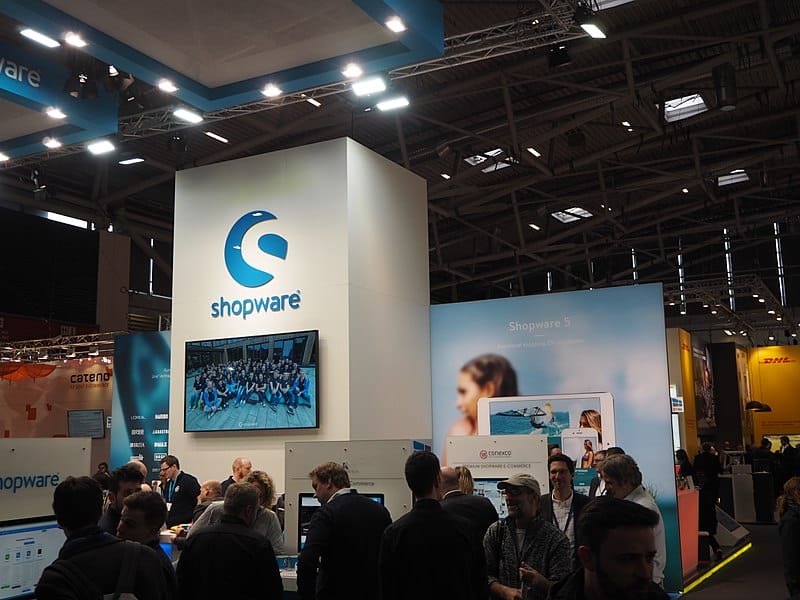
Shopware booth at the Internet World Fair 2017 in Munich, photographed by Thomas Springer, CC0, via Wikimedia Commons
A key advantage of Shopware lies in its ability to extend functionality through plugin development. This guide thoroughly examines the Shopware plugin development, covering all phases from conception to execution and offering developers invaluable insights.
An overview of Shopware
Shopware is a versatile and powerful open-source e-commerce platform, carefully designed for online businesses of all sizes. Originally from Germany, the company quickly gained worldwide recognition for its user-friendly interface and extensive customization options.
Based on a modern technological foundation, this platform meets the requirements of both smaller companies and established corporations.
Shopware's key appeal lies in its plugin-based architecture, which simplifies the process of extending its functionality. With an extensive collection of plugins, merchants can implement custom features tailored to their specific business needs without modifying the platform's core code.
This adaptability is invaluable for art businesses with an online shop that want to stand out in a highly competitive market
The importance of plugin development for Shopware
Creating plugins for Shopware opens up a wealth of possibilities for developers and companies alike.
Here are several compelling reasons why getting started with plugin development is essential:
Customization and versatility: Every business has different requirements, and plugins offer tailored solutions. Whether it's integrating a payment gateway, expanding SEO features, or introducing new shipping methods – plugins provide the versatility needed to personalize your online store.
Improved user experience: Plugins play a crucial role in improving the user experience by integrating features that optimize navigation, accelerate checkout processes, and enhance overall user interaction. Ultimately, this improvement can lead to higher conversion rates.
Scalability: As companies grow, their needs evolve. Shopware plugins enable seamless scalability because they can be easily updated or replaced without disrupting the entire system. This flexibility is particularly beneficial for companies that anticipate growth or need to manage seasonal fluctuations.
Community and Support: The active and dynamic community of developers and users within Shopware actively contributes to the platform's ecosystem. This vibrant community provides developers with access to a wealth of resources, tutorials, and forums that support them in plugin development and troubleshooting.
Market demand: As Shopware grows in popularity, the demand for high-quality plugins continues to rise. Plugin development presents a lucrative business opportunity for developers who want to monetize their skills and contribute to the thriving Shopware ecosystem.
Important steps in Shopware plugin development
Developing a successful plugin requires careful planning and precise execution. The following are the key phases in the Shopware plugin development process:
01 Planning and Design:
Getting started with plugin development begins with defining the purpose and functionality and includes several important sub-steps:
Identify the problem: Gain insight into the individual needs of your target users. What challenges do they face that your plugin can solve? Conducting surveys or interviews can provide valuable information.
Define requirements: Compile a comprehensive list of the features and functionalities your plugin will offer. Clearly and concisely formulate your goals, including all essential integrations or APIs.
Create a wireframe: Design the user interface and experience using wireframes to plan the layout and functionality of the plugin. This visual guide serves as a roadmap throughout the entire development phase.
Set goals: Define measurable goals for your plugin, including performance benchmarks, user adoption rates, and feedback metrics. These metrics will be crucial for evaluating your plugin's success after launch.
02 Creating the plugin structure
After planning your plugin, the next step is structuring it within Shopware. This process requires creating a specific folder for your plugin in the "custom/plugins" , using the name of your plugin.
Important files such as "plugin.xml", which contains metadata for your plugin, and "Bootstrap.php", which is responsible for initializing and registering the plugin with Shopware, must be included. Additionally, you should have a resources folder for assets such as templates, CSS, and JavaScript files, as well as a controllers folder to manage requests and responses with your controller classes.
Make sure you adhere to Shopware's file and directory naming conventions to ensure smooth operation and avoid conflicts.
03 Functionality Development
Once the structure is in place, the next step is to address the coding. This development phase involves crucial considerations:
Programming language and framework: Knowledge of PHP and object-oriented programming is crucial, as Shopware is PHP-based. Familiarity with Symfony, the Shopware framework, can also be advantageous.
Adherence to coding standards: Maintaining code quality and compatibility requires adherence to Shopware's coding standards. Tools like PHP CodeSniffer are invaluable for enforcing these standards.
Function implementation: Begin by coding the functions described in the planning phase. Divide the development into manageable tasks and focus on one function at a time.
Using APIs: By using Shopware's own APIs and services, you can extend the functionality of your plugin, save time and ensure consistency across the entire platform.
04 Quality Assurance
Testing plays a crucial role in the plugin development lifecycle. It helps identify bugs, ensure compatibility, and validate that the plugin meets the predefined requirements from the planning phase. The various testing methods you should consider include:
Unit testing: A method for testing individual components of your plugin to ensure their proper functionality. PHPUnit stands out as a widely used framework for PHP unit testing.
Integration tests: Validate the seamless integration between your plugin and other Shopware components as well as third-party services to ensure a smooth user experience.
User Acceptance Testing (UAT): Before releasing your plugin, task a group of users with testing it in real-world scenarios. Gather feedback and make necessary adjustments based on their interactions.
Performance tests: Evaluate the performance of your plugin under various loads to ensure that it does not affect shop speed or the user experience.
05 User and Developer Guide
Developing comprehensive documentation is essential for both end users and developers. Solid documentation enhances the user experience and reduces the need for extensive support.
Make sure your documentation includes the following:
Installation instructions: Provide detailed step-by-step instructions for installing and configuring the plugin. Consider supplementing these with screenshots or video tutorials to improve user support.
Functional descriptions: Clearly describe each function of the plugin and explain its advantages and optimal use.
Troubleshooting guide: Provide solutions for common problems that users might encounter when using the plugin.
Code documentation: If you intend to share your code or allow developer contributions, include comments and documentation in the code to clarify its functionality.
06 Ongoing support and maintenance
After market launch, providing continuous support and updates is crucial.
This commitment includes:
Customer support
Offer users support for any questions or problems they may encounter. Consider implementing a support ticket system for efficient request management.
Regular updates
Keep your plugin up to date with the latest Shopware releases and security patches. This not only improves performance but also strengthens user trust.
Collect feedback
Actively gather user feedback to identify areas for improvement. Use surveys, reviews, and direct communication to gain valuable insights.
Tips for successful Shopware plugin development
To increase your chances of success when developing Shopware plugins, please note the following tips:
Stay up to date: Keep informed about the latest trends and updates in the Shopware community. Participate in forums, attend webinars, and join local meetups to network with other developers.
Collaboration: For larger projects, consider collaborating with other developers. Practices like pair programming or code reviews can improve the quality of your code and open up new perspectives.
Optimize for performance: Focus on writing efficient code and optimizing database queries. Use caching techniques where appropriate to increase the speed and responsiveness of your plugin.
Ensure security: Adhere to best security practices to protect your plugin from vulnerabilities. Conduct routine code audits and remain vigilant about potential security risks.
Interact with users: Build a community around your plugin by interacting with users. Set up forums, social media groups, or newsletters to keep them informed about updates and new features.
Promote your plugin: Once your plugin is ready, publicize it through various channels, such as social media, blog posts, and the Shopware community. Ponder offers free trials or discounts to attract first-time users.
Developing Shopware plugins offers developers and freelancers a fulfilling opportunity to create innovative solutions for online stores. By carefully following the prescribed development steps and best practices , you can create top-notch plugins that enhance the Shopware user experience.
As demand for Shopware solutions continues to rise, now is the ideal time to get involved in plugin development and contribute to this dynamic ecosystem.
Owner and Managing Director of Kunstplaza . Publicist, editor, and passionate blogger in the fields of art, design, and creativity since 2011. Graduated with a degree in web design from university (2008). Further developed creative techniques through courses in freehand drawing, expressive painting, and theatre/acting. Profound knowledge of the art market gained through years of journalistic research and numerous collaborations with key players and institutions in the arts and culture sector.
Regardless of your field of activity as a web designer, graphic designer, game developer, photographer, programmer, product designer, journalist, content creator or influencer, as a self-employed person you have a wide range of tasks to manage.
From customer acquisition and successful project implementation to time management and financial administration – including the often unpopular tax matters.
Good information and the right online tools are crucial for a successful career as a freelancer or content creator.
In this section you will find helpful articles and valuable advice with tips specifically for freelancers.
We use technologies such as cookies to store and/or access device information. We do this to improve your browsing experience and to display (non-)personalized advertising. If you consent to these technologies, we can process data such as browsing behavior or unique IDs on this website. Refusal or withdrawal of consent may adversely affect certain features and functions.
Functional
Always Active
Technical storage or access is strictly necessary for the legitimate purpose of enabling the use of a specific service expressly requested by the subscriber or user, or for the sole purpose of carrying out the transmission of a message over an electronic communications network.
Preferences
The technical storage or access is necessary for the legitimate purpose of storing preferences that were not requested by the subscriber or user.
statistics
Technical storage or access that is solely for statistical purposes.Technical storage or access that is used solely for anonymous statistical purposes. Without a subpoena, the voluntary consent of your internet service provider, or additional recording by third parties, the information stored or retrieved for this purpose cannot generally be used to identify you.
marketing
Technical storage or access is required to create user profiles, to send advertising, or to track the user on one or more websites for similar marketing purposes.




 J-Line Sustainable Christmas Tree in Modern Style Made of Foldable Paper (White)
124,00 €
J-Line Sustainable Christmas Tree in Modern Style Made of Foldable Paper (White)
124,00 €