You could put it this way: A phone case is the smallest canvas we hold in our hands every day – and it can be customized online in just a few minutes with your own photo, pattern, illustration, or text. Good designs follow the same rules as a poster: a clear motif, deliberate color choice, and careful consideration of the border and camera cutout. This overview shows which ideas work and how they look in print.
Ideas for your own phone case: We show you how to create a personal design using photos, patterns, and typography. Photo by Burst, via Pexels
Seven approaches cover almost every style – from family photos to abstract color fields:
Photography: Portrait, landscape or close-up
Original artwork: watercolor, drawing or digital illustration as a scan
Patterns and repeats: geometry, botany or terrazzo
Typography: quote, name, initials or a special date
Collage: several photos in mood board style
Minimalism: a single color surface plus a single detail
Material illusion: Marble, linen or wood as a printed motif
All seven approaches can be implemented in an online configurator without any design knowledge. A good initial concept and a few simple design rules are crucial.
Examples from several idea categories: photo, pattern, typography and illustration. Photo by Burst, via Pexels
Why is a phone case a design object?
Few everyday objects are as constantly visible as the smartphone: It lies on the table in the café, in the meeting, next to the laptop—and regularly appears in photos. The case is far more than just protection. It's the garment of a device we hold in our hands every day, and it functions like a small poster: It displays color, attitude, and taste.
This is precisely where the idea of a personalized phone case comes in. Instead of uniform mass-produced goods, a unique item is created that offers the same level of protection as a standard case, but tells a personal story: a picture from your own photo archive, a self-painted motif, a meaningful phrase. For those who already consciously design their surroundings – from wall color to clothing – the phone case offers a logical extension of this style. It's probably the smallest design object in everyday life, yet one of the most frequently seen.
What design rules apply to the envelope format?
The envelope format presents its own set of requirements: a small, portrait-oriented surface, a camera cutout at the top, and edges that will be trimmed during printing. A simple design grid consisting of three zones is helpful: the security zone in the center of the surface, the camera cutout at the top, and the trim area at the edges.
Those who consider these areas from the outset avoid the most common mistakes – cut-off faces, halved text, and uneven edges. For printing on a phone case, the rule is: one main motif, bold colors, camera cutout, and careful consideration of the edges.
Composition: one motif, one viewpoint
On a small surface, the eye is unforgiving of distractions. A single, clearly recognizable main subject is more effective than three competing elements. In portraits, the face should not be positioned directly behind the camera cutout and should have sufficient distance from the top edge. Think like a poster: what isn't legible from two meters away won't work on the cover either. Empty space isn't wasted, but rather part of the composition – it gives the subject room to breathe.
Color: Strong colors print more reliably than subtle gradients
Printed colors appear more muted than on a bright screen. Rich, high-contrast tones retain their impact, while very dark images quickly become indistinct areas in print. Subtle color gradients can appear streaky or uneven on small surfaces; solid, clearly defined colors are the safer choice. A noticeable light-dark contrast ensures that the image remains legible even at arm's length.
Typography: Few words, large font, clear contrast
Text on the cover follows a simple rule: the fewer characters, the greater the impact. Initials, a name, or a short quote in a bold font are easy to read; long sentences in a thin font appear blurry in print. A clear contrast between text and background is essential, as is sufficient space from the camera cutout and edges to ensure no letters are lost during cropping.
What are some ideas for a personalized phone case?
Which idea is suitable depends on your own image archive, style, and the desired effect. These seven categories show the range – from classic photography to minimalist color fields.
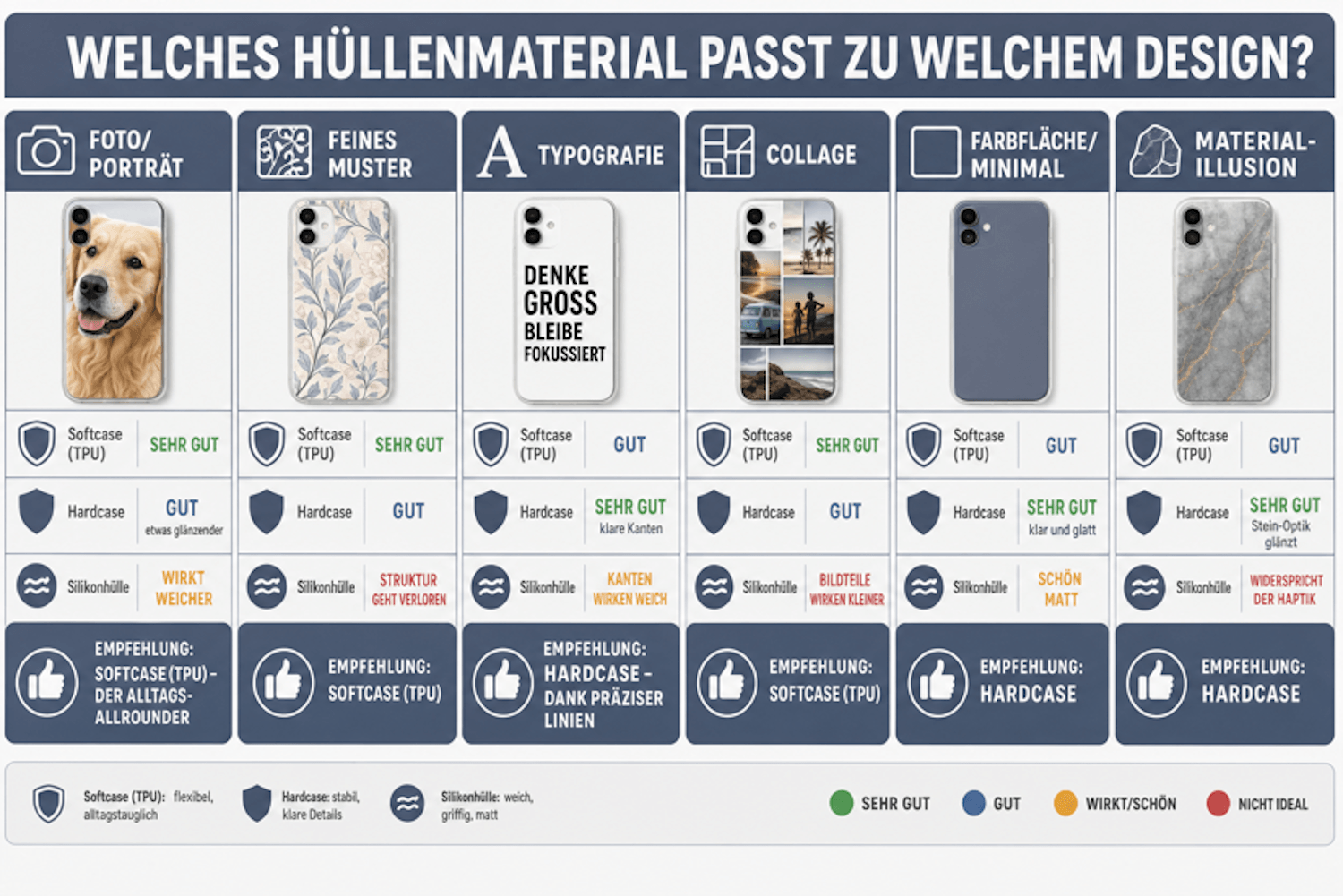
Infographic: Which case material suits which design? (click to enlarge)
1. Photography: Portrait, landscape, detail shot
The classic choice remains the photograph: a portrait of a partner, child, or dog; a landscape from a vacation; a close-up of a flower, wave, or house facade. Bright, sharp images with a clearly recognizable subject in the center work best. Those who don't want to crop the image on screen can upload it and position it directly in the configurator's preview.
2. Own art: watercolor, drawing, digital illustration as a scan
For those who paint or draw themselves, the cover becomes a small exhibition space: a watercolor with soft transitions, an ink drawing with clear lines, a digital illustration from a tablet. Scanned or photographed in good light, one's own artwork becomes an everyday object. Strong contrasts and clear forms are most effectively showcased in print.
In the following video, the YouTuber from Therapy Designs(@therapydesigns) clearly demonstrates how her design workflow works with the popular design program Canva . While Canva 's user interface has changed slightly since then, the workflows shown remain valid.
3. Patterns and repeats: geometry, botany, terrazzo
A repeating pattern elegantly fills the surface without any single motif having to fear being cropped: geometric diamonds, botanical tendrils, playful terrazzo. Pattern designers like William Morris have shown how much ornamental surfaces can enhance simple everyday objects. For small formats, the repeat should not be too fine so that the structure remains legible even from a distance.
4. Typography: Quote, name, initials, date
Words transform the cover into a personal message: a favorite quote, your own name, ornate initials, or a date that holds special meaning. Large serif letters on a calm background create a classic look, while an angular sans-serif in a contrasting color offers a modern feel. Size is crucial – anything printed at arm's length is lost.
5. Collage: several photos, mood board aesthetic
Several pictures tell more than one: A collage of three to five photos in an irregular grid acts like a small mood board – vacation moments, friends, favorite places. To ensure the result looks curated and not random, a common color scheme across all the images is helpful. Too many subjects in a small space, on the other hand, make each individual image appear small and unrecognizable.
6. Minimalism: A solid color plus one detail
The most radical idea is the quietest: a bold color field plus a single small element—a line, a dot, a delicate branch, a tiny figure. The reduction to the essentials, as exemplified by the Bauhaus , works particularly well on the envelope format because the small surface immediately reveals any superfluous element. Generous white space is not a flaw here, but rather the very stylistic device.
7. Material illusion: Marble, linen, wood as a printed motif
Marble, linen texture, or wood grain give the cover the appearance of a different material—without the weight or maintenance. The effect relies on illusion: up close, the print is visible; from a distance, it looks like stone or fabric. Calm, generous grains work better than very intricate textures.
Incidentally, a great photo gift idea: A phone case with a personal photo or saying is unique, affordable—usually under €30—and used every day. Whether it's a shared memory or a design only the recipient understands, few gifts of this size are as individual.
How do I prepare a photo or artwork for printing?
The most beautiful design will fail due to a poor file. Fortunately, the requirements are manageable – and with a few checks before uploading, the result is predictably good.
What resolution does a design for a phone case need?
As a general rule: the closer to the original, the better. The original file from your camera or smartphone – not a copy from a messaging app, which is automatically heavily compressed. Drawings, watercolors, and other analog works should be scanned; around 300 dpi has proven to be a practical guideline.
The specific requirements can vary depending on the configurator and print area – the preview usually indicates whether the file is large enough. Cropping the image is also part of the preparation: The image should be in portrait format with space around all edges to ensure nothing important is lost during trimming.
Which images look different in print than on screen?
The screen is backlit, while the print only reflects ambient light – this makes printed images appear more muted and somewhat darker overall. Nighttime shots and dark scenes, in particular, lose detail in print, with fine details getting lost in dark areas. If you want to work with such images, brighten them slightly beforehand and increase the contrast. Bright, high-contrast images with clear color areas are the safest choice for a vibrant print result.
This overview shows which types of motifs are particularly easy to print and where caution is advised:
Motif type
Effect under pressure
risk
Tip
Bright portrait
It shines, details remain clear
Small amount
Safest choice — place the motif centrally
Dark night photo
It quickly becomes flat and dull
Fine details get lost
Brighten and increase contrast beforehand
subtle color gradient
May appear uneven
Striping possible
It's better to choose solid, clearly separated colors
Powerful graphics
Rich, clear color fields
Small amount
Safest choice — ideal for vector designs
Small-scale font
Becomes difficult to read
Blurry letters
Significantly increase font size
Scan of a drawing
Very good at high contrast
Pale lines disappear
Scan at approximately 300 dpi and check the contrast
Bright portraits and bold graphics print most reliably. Regardless of the design, it's worth checking the product information before ordering: details about colorfast, abrasion-resistant printing are the most important quality indicator for a personalized phone case – they determine whether the design will still look as good as new after months of use.
In YouTuber Boss from Home's (@bossfromhome1357) , we learn not only about design and printing options for phone cases, but also how this solopreneur launched her own online business for custom and personalized phone cases on Etsy . Follow this step-by-step guide for beginners, which covers topics such as designing with Printify, SEO optimization, pricing, and everything else you need to know to successfully sell phone cases.
And Meeco (@meecoart) shows us, using their product presentation of the HTVRont H17 hot press for phone cases, how sublimation printing can be used at home for designing phone cases:
Which case material suits which design?
Three types of cases dominate, and they differ significantly: The TPU is a flexible, slightly matte all-rounder on which photographic images appear natural. The hard case is a rigid shell with a smooth surface and clean edges – the perfect canvas for graphics and typography. Finally, the silicone case feels soft and grippy in the hand; its tactile quality is paramount, and colors tend to appear somewhat softer on it.
You should not mix up these three terms: TPU is an elastic plastic, silicone is a separate, softer material, and the hard case is a rigid plastic shell.
This matrix shows which design idea works best on which type of case:
Design idea
Softcase (TPU)
Hardcase
Silicone case
Recommendation
Photo/Portrait
Very good, natural effect
Okay, a little shinier
It feels softer
Softcase (TPU) — the everyday all-rounder
Fine pattern
Very good
Good
Structure is lost
Softcase (TPU)
typography
Good
Very good, clear edges
Edges appear soft
Hardcase — thanks to precise lines
collage
Very good
Good
Image parts appear smaller
Softcase (TPU)
Color area/Minimal
Good
Very good, clear and smooth
Beautifully matte
Hardcase
Material illusion
Good
Very good, the stone look shines
Contradicts the haptic
Hardcase
For those unsure about the image quality, a TPU soft case is rarely a bad choice for photos; graphics and text appear clearest on a hard case. Silicone is the best option for those who prioritize a soft feel over absolute sharpness.
How does the self-design function work online?
Anyone wanting to design their own phone case needs neither software nor prior knowledge: Modern online configurators make it possible to design a phone case in just a few minutes – completely without design skills. The process is the same for most providers:
Choose a model: Personalized phone cases are available for almost every device – iPhone, Samsung Galaxy, Google Pixel, and Xiaomi, and often older models as well. Availability is shown in the respective configurator.
Upload image: Upload a photo, scan or graphic as a file.
Positioning: Move and zoom the subject, keeping an eye on the safety zone and camera cutout.
Add text: optionally add name, date or quote.
Check preview: The digital preview shows the result before ordering.
Ordering: Each item is manufactured individually upon order.
For example, if you want to design your own phone case , you'll go through exactly these steps – from choosing the model and uploading the design to previewing it. However, you'll need a little patience: because each case is individually produced, you should expect a wait of several business days; a promise of delivery on the exact day isn't realistic with custom manufacturing.
Am I allowed to print other people's artwork on my phone case?
The short answer: Your own photos and artwork are fine, but using someone else's work requires the necessary usage rights. Anyone wanting to use someone else's work—such as a photo or illustration—needs a license or permission; finding it online doesn't replace that. Well-known copyrighted works, trademarks, or characters also shouldn't be on the cover.
AI-generated designs occupy a special position: Here, the terms of use of the respective tool determine whether and how the results may be used. Those who opt for their own designs are always on the safe side – and also get a more personalized design.
Frequently asked questions about designing your own phone case
What ideas are there for a custom phone case?
The range extends from photography and original artwork to patterns and typography, collages, minimalist color fields, and material illusions like marble or wood. Which category is suitable depends on your personal style and image archive—if in doubt, a bright portrait or a bold graphic is the easiest place to start.
How do I design a phone case with my own design?
You prepare your design as a file, select your mobile phone model, upload the image to the online configurator, and position it. After adding optional text elements, you check the preview and place your order. The entire process takes only a few minutes and requires no design knowledge.
What resolution does a photo need for a phone case?
The original image from your camera is best. Scan drawings and paintings at around 300 dpi. Avoid using messenger copies because they are heavily compressed. The preview in the configurator will show you whether your file is large enough for the print area.
Can I have my own painting or drawing printed on a phone case?
Yes. Scan the artwork at high resolution or photograph it in bright, even light without shadows. Images with strong contrasts and clear shapes look best in print; very delicate lines or pale gradients, on the other hand, can lose their impact.
What material is best for a phone case?
For everyday use, the TPU soft case is a well-balanced all-rounder. Graphic designs with clean lines look particularly good on a hard case, while those who prefer a soft, grippy feel will be happy with a silicone case. The choice ultimately comes down to design and personal preference.
Which colors look best on a phone case?
Rich, high-contrast colors retain their vibrancy in print. Very dark images can quickly appear dull, and very subtle color gradients can look uneven. Solid, clearly defined colors with noticeable light-dark contrast are the safest choice.
Is a custom-designed phone case a good gift?
Yes, it combines personality with everyday practicality: personally chosen, usually under 30 euros, and used daily. A shared photo, an inside joke inscription, or a hand-drawn design make it a truly unique gift.
Am I allowed to print artwork by other artists on my phone case?
Only if you own the usage rights, for example through a license or permission. Your own photos and works are generally unproblematic. For AI-generated images, you should also check the terms of use of the tool used.
For which mobile phone models can I design my own case?
For iPhone, Samsung Galaxy, Google Pixel, Xiaomi, and many other devices—often including older models. Some providers also extend the design to tablets or AirPods cases. You can see which models are available directly in the configurator's model selection.
Small area, big impact
Designing your own phone case is not an art project with hurdles, but a small, quick design process: Choose a motif with meaning, consider the safety zone, camera cutout and cropping, opt for bold colors and a main motif, choose the material to match the design and check print quality and preview before ordering.
In this way, a mass-produced item becomes a unique piece that is visible every day — perhaps the smallest canvas of everyday life, but one with a great impact.
Owner and Managing Director of Kunstplaza . Publicist, editor, and passionate blogger in the fields of art, design, and creativity since 2011. Graduated with a degree in web design from university (2008). Further developed creative techniques through courses in freehand drawing, expressive painting, and theatre/acting. Profound knowledge of the art market gained through years of journalistic research and numerous collaborations with key players and institutions in the arts and culture sector.
We use technologies such as cookies to store and/or access device information. We do this to improve your browsing experience and to display (non-)personalized advertising. If you consent to these technologies, we can process data such as browsing behavior or unique IDs on this website. Refusal or withdrawal of consent may adversely affect certain features and functions.
Functional
Always Active
Technical storage or access is strictly necessary for the legitimate purpose of enabling the use of a specific service expressly requested by the subscriber or user, or for the sole purpose of carrying out the transmission of a message over an electronic communications network.
Preferences
The technical storage or access is necessary for the legitimate purpose of storing preferences that were not requested by the subscriber or user.
statistics
Technical storage or access that is solely for statistical purposes.Technical storage or access that is used solely for anonymous statistical purposes. Without a subpoena, the voluntary consent of your internet service provider, or additional recording by third parties, the information stored or retrieved for this purpose cannot generally be used to identify you.
marketing
Technical storage or access is required to create user profiles, to send advertising, or to track the user on one or more websites for similar marketing purposes.







 J-Line Semi-abstract nude painting "Nocturnal Nude", black and white fine art print, framed
225,00 €
J-Line Semi-abstract nude painting "Nocturnal Nude", black and white fine art print, framed
225,00 €