Learning digital drawing is easier today than it was just a few years ago. Even with a regular computer, a tablet, or an inexpensive graphics tablet, you can bring your own ideas to life digitally. Many programs offer simple tools that allow you to draw, color, or edit images – even without prior experience. Here you'll learn which devices and programs are suitable for beginners, what fundamental skills are essential, and how you can implement your own creative projects on your PC step by step.
Many programs are clearly structured and offer tools that allow you to create initial drawings without lengthy preparation. This makes digital work particularly suitable for people who want to try out creative ideas directly.
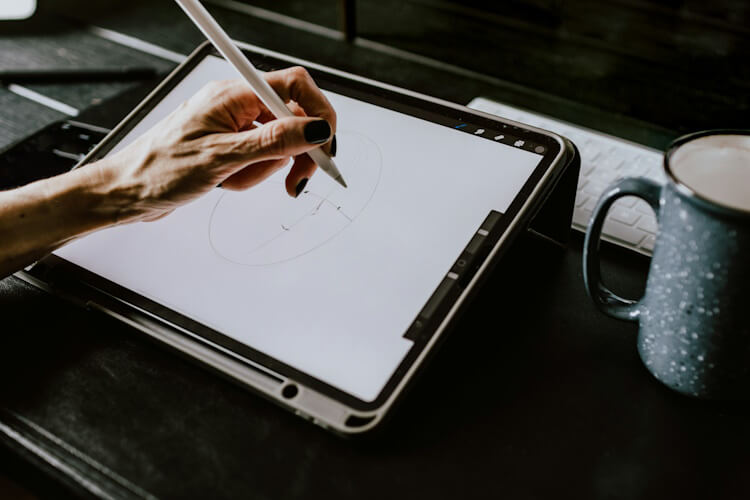
Digital Drawing: Advantages for Beginners Photo by Kelly Sikkema @kellysikkema, via Unsplash
A major advantage is that mistakes can be corrected quickly. Unlike drawing on paper, you can move lines, change colors, or delete individual elements without having to start completely from scratch. This simplifies the learning process and reduces the uncertainty many beginners feel.
Furthermore, you can flexibly test different techniques. Many drawing programs already include ready-made brushes, templates, or color palettes. This allows you to quickly get a feel for which working method suits your own ideas.
Access to learning materials is also relatively easy: On platforms like YouTube, in online courses or drawing communities you can find many free exercises and step-by-step instructions.
Here's what you need to get started
You don't need professional studio equipment to get started with digital drawing. In many cases, a regular computer and the right software are sufficient. The most important thing is that the device is easy to use.
Selecting the right hardware
Basically, you can create digital drawings on various devices:
For simple exercises or initial sketches, an existing laptop is often sufficient. If you plan to draw more frequently or tackle larger projects later on, more powerful hardware is worthwhile . Programs with many layers or high-resolution files, in particular, require ample RAM.
Here's what you should pay attention to:
RAM: at least 8 GB
Screen: as color-accurate and anti-reflective as possible
Processor: A current mid-range processor is sufficient
Storage space: sufficient space for image files
Software: Drawing programs for beginners
Many programs offer an easy entry point and already include all essential graphics functions. Some applications are free, others require payment.
Popular programs for beginners include:
Krita– free and especially suitable for digital drawing
Autodesk SketchBook– free to use in its basic version
Clip Studio Paint– paid, but a trial version is available.
Procreate (for iPad)– one-time purchase in the App Store
Adobe Photoshop– paid subscription model
Free programs are often perfectly adequate for beginners. A clear and user-friendly interface is particularly important. This allows you to focus more on drawing and less on technical settings.
Working with a mouse, graphics tablet or tablet
You can technically draw with a regular computer mouse. However, a graphics tablet is better suited for more precise lines and more natural movements.
There are three different versions:
Graphics tablet without a screen: Drawing on a surface, display on the monitor
Graphics display: Direct drawing on an integrated screen
Tablet: Completely mobile working with touchscreen and stylus
Many beginners start with a simple graphics tablet. These devices are relatively inexpensive and already offer good control when drawing.
Tip: Don't buy the most expensive equipment right away. It often only becomes clear after a few weeks which features you really need.
Learn digital drawing: The most important basics
Those who want to achieve better results in the long run should first familiarize themselves with the most important basic functions. Many drawing programs work similarly.
Layers, brushes and colors
Layers are among the most important features in digital drawing. They allow you to edit individual image elements separately. This lets you adjust sketches, colors, and details independently.
A typical setup looks like this:
Level one: rough sketch
Level two: clean lines
Level three: Colors
Level four: Shadows and effects
Working with layers provides a better overview and prevents unnecessary errors in image composition.
The choice of brush also affects the result. Many programs offer different brushes for:
fine lines
Hatching
Color areas
Texture or watercolor effects
Especially in the beginning, it helps to use only a few brushes regularly. This way you will develop a feel for pressure, linework, and the overall effect of the image more quickly.
Colors also play an important role. Instead of immediately working with many effects, you should first test simple color combinations. This will help you better understand how contrasts and light work in the image.
Make good use of templates and reference images
Many beginners try to draw directly from their imagination. This often results in inaccurate proportions or unclear shapes. Reference images help to construct motifs more realistically.
Suitable templates could be:
Photos
simple sketches
Perspective aids
Color palettes
Anatomy or object studies
The point is not simply to copy images. Rather, references help to better understand shapes, light, or perspective.
First exercises for better results
Regular practice is usually more effective than elaborate individual projects. Especially in the beginning, simple drawing exercises help develop confidence in using digital tools.
Useful exercises for beginners:
Draw straight lines and circles
Combine simple shapes
Testing light and shadow
Sketching objects from different perspectives
Perform short daily drawing exercises
Even just a few minutes a day often improves your control over pen and drawing surface. At the same time, you will gradually develop your own style and learn to implement creative ideas more effectively.
Easily implement creative projects on the computer
Once you've mastered the basic tools, you can start implementing your first projects. The results don't have to be perfect. What's most important is gaining practical experience and trying out different ways of working.
Create illustrations and sketches
Many people start with simple sketches or small illustrations. These projects are well-suited for practicing how to work with lines, colors, and layers.
For beginners, motifs such as the following are suitable:
simple figures
plants or animals
everyday objects
Landscapes
small comic drawings
Start by working with rough shapes. Add details later. This keeps the drawing clear and helps you avoid unnecessary corrections.
A consistent work routine is also helpful:
Create a sketch
Work out lines cleanly
Add colors
Light and shadow complement
Save and export the file
This structure helps you maintain an overview even in larger projects.
Edit and combine photos
Digital creativity is not limited to drawings. Many programs also allow the editing and combination of photos.
This allows you, for example:
Exchanging backgrounds
Customize colors
Add text elements
Creating collages
Combining drawings with photos
The combination of photo editing and drawing opens up many creative possibilities. This often results in social media graphics, posters, or simple design drafts.
Make sure you use sufficiently large image files. Blurry or heavily compressed images will significantly degrade the quality of the result.
Download and use images from the internet
Many creative projects use templates or reference images from the internet. When doing so, you should pay attention to usage rights and download files only from trustworthy sources whenever possible. Especially when starting out, it also helps to understand basic terminology related to digital files – for example,what "download" actually meansand how content is stored and processed on your own device.
This helps you avoid legal problems, especially with public projects or social media content.
Work creatively on your PC in simple steps
Digital drawing offers an easy entry point into creative work on the computer. Even with basic hardware and free software, you can create your first sketches, illustrations, or design ideas. A structured approach is key. Understanding essential functions like layers, brushes, and file formats will quickly build confidence in using digital tools. Regular practice will further help you develop your own workflow and personal style.
Owner and Managing Director of Kunstplaza . Publicist, editor, and passionate blogger in the fields of art, design, and creativity since 2011. Graduated with a degree in web design from university (2008). Further developed creative techniques through courses in freehand drawing, expressive painting, and theatre/acting. Profound knowledge of the art market gained through years of journalistic research and numerous collaborations with key players and institutions in the arts and culture sector.
We use technologies such as cookies to store and/or access device information. We do this to improve your browsing experience and to display (non-)personalized advertising. If you consent to these technologies, we can process data such as browsing behavior or unique IDs on this website. Refusal or withdrawal of consent may adversely affect certain features and functions.
Functional
Always Active
Technical storage or access is strictly necessary for the legitimate purpose of enabling the use of a specific service expressly requested by the subscriber or user, or for the sole purpose of carrying out the transmission of a message over an electronic communications network.
Preferences
The technical storage or access is necessary for the legitimate purpose of storing preferences that were not requested by the subscriber or user.
statistics
Technical storage or access that is solely for statistical purposes.Technical storage or access that is used solely for anonymous statistical purposes. Without a subpoena, the voluntary consent of your internet service provider, or additional recording by third parties, the information stored or retrieved for this purpose cannot generally be used to identify you.
marketing
Technical storage or access is required to create user profiles, to send advertising, or to track the user on one or more websites for similar marketing purposes.