Whether you are an aspiring musician looking to share your talents with the world, a digital artist aiming to create stunning visual works, or a freelancer or small business owner desperately seeking to expand their online presence – video editing skills are essential in today's digital landscape.
In a time when audiovisual content is more important than ever and the demand for appealing videos is constantly growing, you should definitely master this skill.
However, with the sheer number of available software options , finding the right entry point into the world of video editing . The range extends from easy-to-use programs for beginners to complex tools for professional users. This can lead to feeling overwhelmed and unsure which program best suits one's needs.
To make this decision easier for you and to help you get started, we have compiled the essential aspects that you should definitely consider when choosing a suitable video editing program .
It's important to be aware of features such as ease of use, the availability of tutorials and support, as well as customization options and export quality.These factors can be crucial in determining whether you can successfully realize your creative visions or whether you stumble over technical hurdles.
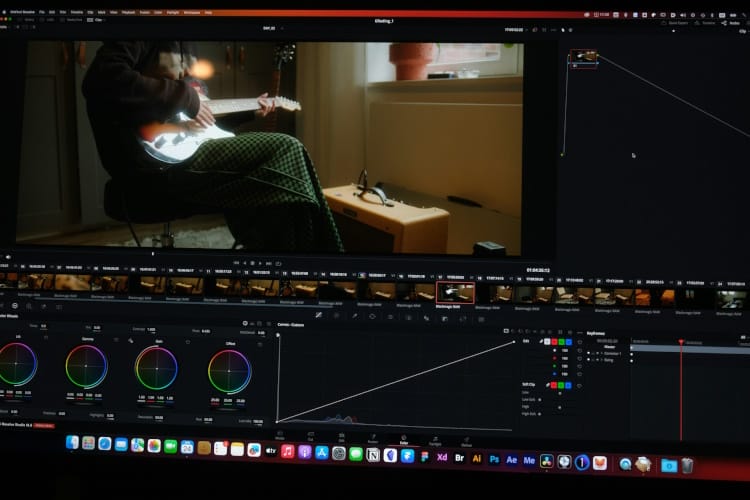
The 5 best video editing programs for YouTube beginners. Photo by Alan Alves @alanalves, via Unsplash
Furthermore, we would like to introduce you to five of the best video editing software options , specifically for YouTube beginners , which stand out for their ease of use and functionality. These programs not only meet the criteria mentioned above but also offer valuable tools and opportunities for creative expression.
With the right software at your side, you have the potential to create compelling videos that captivate your audience and significantly strengthen your online presence. Let's take a step closer to your video content goals together!
Criteria for choosing a good video editing program for YouTube beginners
Ease of use: As a beginner, you certainly want software that is intuitive and easy to use. The user interface should be easy to navigate, and the basic functions should be straightforward to use.
Editing functions: The software should offer a wide range of editing functions to meet your needs. These include basic tools such as cutting, trimming, splitting, and merging clips, as well as advanced features like adding transitions, text overlays, and audio adjustments.
Budget and price: It's important to keep your budget in mind and consider what you're getting for your money. Some programs offer a free version with basic features, which can be a good starting point for beginners.
Video format support: The software should support the formats in which your camera records, as well as the formats supported by YouTube.
Customer support and learning resources: Tutorials, guides, and a helpful support team are especially valuable for beginners. If the software also has an active user community, this provides helpful support for learning and troubleshooting.
The good news is that there are several video editing programs specifically designed for beginners. These programs offer a balanced user-friendliness, versatility, and clear interfaces, as well as a range of easy-to-use yet powerful editing tools for creating professional-looking videos.
Let's take a closer look at five such programs.
The top 5 programs for getting started with YouTube videos
Clipify – a user-friendly video editor for beginners
Clipify – a user-friendly video editor for beginners
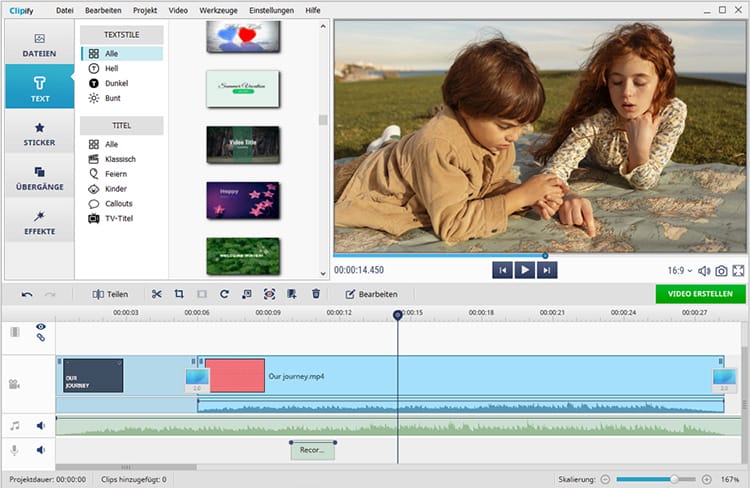
Clipify is one of the best software solutions for editing YouTube videos for beginners. It's free to download, easy to learn, and offers a variety of useful features, tools, media, and effects. It also includes presets for creating videos in the correct format for YouTube and responsive customer support.
Thanks to the simple, intuitive user interface and drag-and-drop workflow, even a complete beginner can create an appealing video for YouTube in just a few minutes.
With Clipify, you can easily arrange multiple video clips on the timeline, cut and trim them as needed to keep only the most exciting sequences, add animated titles, and overlay text, emojis, and fun stickers. You can also overlay videos of your reaction onto the main footage to create reaction videos, improve image quality, stabilize shaky footage with a single click, record voice-overs, and create screen recordings for tutorials.
Clipify's basic editing tools are available for free, but to access advanced features like chroma key and a royalty-free music library, you need to upgrade to the Pro version, which still remains very affordable.
Advantages:
User-friendly, easy-to-navigate interface
Assistant mode for guided video editing
Over 200 royalty-free music tracks
Chroma key for replacing background videos
Dozens of effects to make your videos stand out
Over 30 export formats, including those suitable for YouTube.
Disadvantages:
Available for Windows PCs only
Watermarks on videos and limited features in the free version
SmartSHOW 3D – A video slideshow maker with 3D effects
SmartSHOW 3D – A video slideshow maker with 3D effects
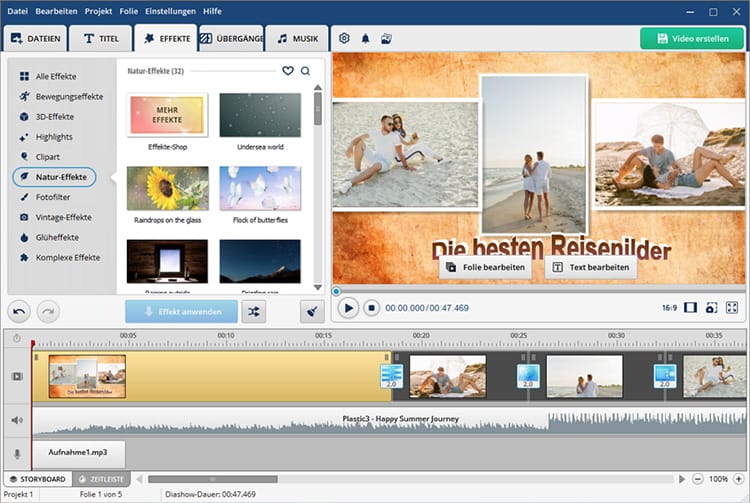
SmartSHOW 3D is designed to transform your clips and images into stunning videos with spectacular 3D effects . Although it's a slideshow maker, SmartSHOW 3D still has all the features a beginner-friendly YouTube video editor should have. The software offers a wide selection of professionally designed templates that allow you to create amazing 3D photo and video collages, as well as other multi-layered montages, in minutes.
This program includes a wide variety of animation effects – 3D, motion, 3D camera, pan & zoom, as well as many natural effects and smooth or dynamic transitions. You can add music and sound effects from an extensive collection of royalty-free tracks, record voiceovers, and enhance the audio with audio points.
You can also add titles and animated text and export your video in a format suitable for YouTube. By the way, you can test the program for free for 5 days before deciding on a version and a suitable license.
Advantages:
Intuitive user interface and great ease of use
Storyboard and timeline modes for easy assembly
Over 500 animation effects and transitions
Numerous templates for animated 3D collages
Collection of royalty-free music from various genres
Animated travel map function
Free technical support and 12 months of free updates
Disadvantages:
Lack of some video editing features such as speed change
Available for PC only
Slow rendering speed for long videos
Magix Movie Studio – beginner-friendly software with many creative resources
Magix Movie Studio – beginner-friendly software with many creative resources
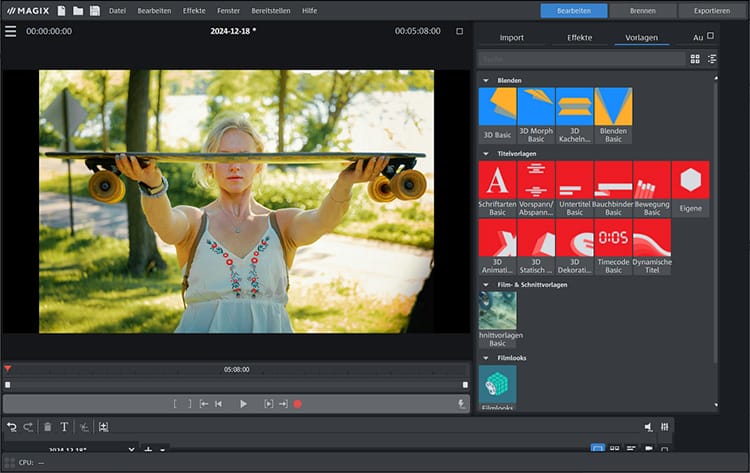
Another highly recommended video editing program for YouTube is Magix Movie Studio – a beginner-friendly software with numerous great features and creative content for PC users. With simple drag-and-drop functionality, you can combine numerous media files of all kinds from any device. The software allows you to add time-lapse and slow-motion effects, animate travel routes, improve image and sound quality, and easily create videos for YouTube.
The program offers access to a vast selection of stock music, film footage, sound effects, and animations. You can use the picture-in-picture function to create tutorials and reaction videos. AI text-to-speech and speech-to-text functions are available for generating subtitles and audio narration.
Furthermore, you can give your videos a unique style with impressive AI effects and comprehensive color correction tools. However, beginners may encounter some problems when using advanced features, and unexpected crashes can occur. The price isn't the lowest either.
Advantages:
Numerous video effects
Reactive editing interface
Support for multicam editing
Great title opportunities
Templates in trailer style
Extensive audio editing
30-day trial version with limited export options
Disadvantages:
Occasional program crashes
Little help with complicated procedures
Missing organizational tools
Wondershare Filmora – a cross-platform video editor with AI features
Wondershare Filmora – a cross-platform video editor with AI features
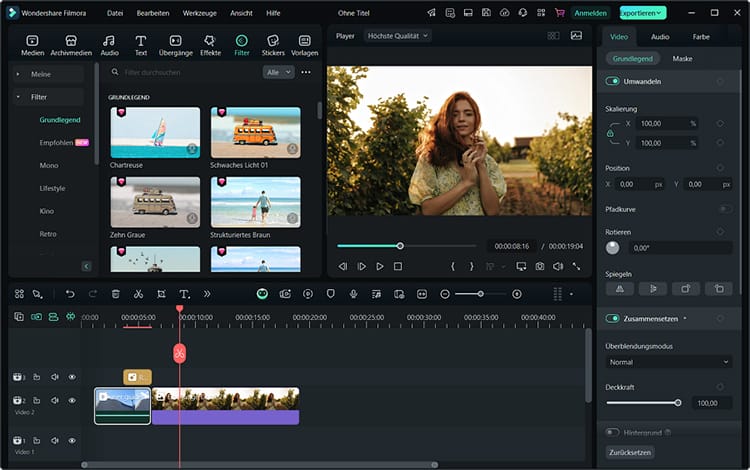
If you need video editing software for YouTube that's available on any device, try Wondershare Filmora – a feature-rich video editor with AI tools that offers versions for PC, Mac, iOS, Android, and the web. In addition to basic video editing tools for trimming and cropping clips, Filmora also offers advanced features like keyframing, motion tracking, and speech recognition.
With Filmora, you can convert videos into YouTube shorts, add dynamic text animations and animated calls to action, easily create voiceovers, and automatically generate subtitles. The new Filmora 13 includes generative AI features such as the AI Copilot for editing, an AI music generator, an AI image creator, and an AI translator.
The new version Filmora 13 includes generative AI features such as AI Copilot Editing and AI Music Generator , which allow you to quickly create high-quality content for your YouTube channel. (In this context, "generative AI features" that the AI is capable of creating new content, such as music, images, or text.)
However, some AI-powered functions are not as precise and powerful as one might wish.
Advantages:
Practical for beginners
Modern and appealing user interface
Fast rendering speed
Many templates, effects, and royalty-free media resources
Automated AI functions for video creation
Keyboard shortcuts for faster editing
Disadvantages:
No multicam editing or VR features
Some AI features are less impressive
Watermarks on videos during the free demo phase
Relatively high price
Pinnacle Studio – Professional video editing software for Windows
Pinnacle Studio – Professional video editing software for Windows
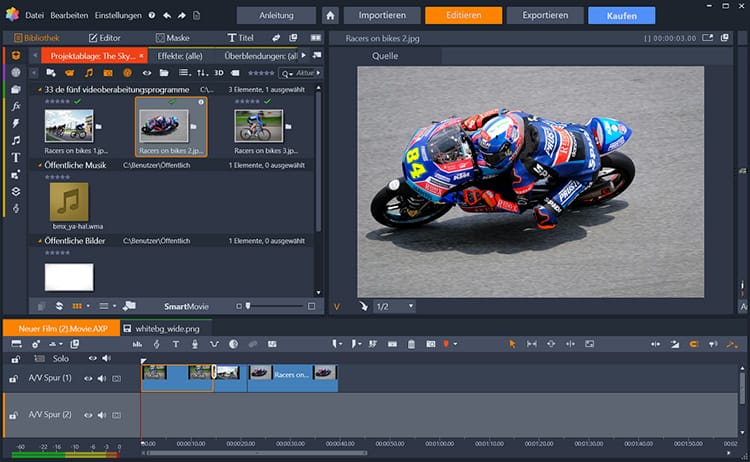
Despite its numerous professional features, Pinnacle Studio a low learning curve and is well-suited for aspiring YouTubers. The latest version, Pinnacle Studio 26 Ultimate, offers every conceivable video editing tool and feature: unlimited video and audio tracks, a multicam editor, cinematic-quality effects, screen recording tools, and much more.
With Pinnacle Studio you can easily merge clips and highlight them with color LUTs (Look-Up Tables or color tables) , remove and replace backgrounds with the green screen tool, apply text or images to moving objects, and make your videos more interesting with time-lapse or slow-motion effects, pan & zoom, or motion blur.
You can also create your own split-screen templates for comparison videos, stabilize videos recorded on the go, edit titles in 3D, and export your videos in a YouTube-compatible format. The main drawback is the price of the fully featured version, but you can get a refund within 30 days of purchase.
Advantages:
Clear user interface
Precise keyframe control
Multicam editing
Many special effects
Comprehensive masking tools
Powerful title editor
Disadvantages:
Limited motion tracking
Uneven application of 360-degree VR
High price and high system requirements
Summary
The right video editing software for YouTube can help you tell a story, convey a message, and captivate your audience. It offers features such as trimming and splitting clips, audio adjustments, adding transitions, and even integrating AI tools for a more sophisticated editing process.
Choose software that suits your needs and experience level. It's advisable to start with a program that offers a balance between simplicity and functionality, allowing you to learn the basics while creating high-quality videos.
With time and a little patience, you will be able to create engaging YouTube content that stands out from the crowd.
Owner and Managing Director of Kunstplaza . Publicist, editor, and passionate blogger in the fields of art, design, and creativity since 2011. Graduated with a degree in web design from university (2008). Further developed creative techniques through courses in freehand drawing, expressive painting, and theatre/acting. Profound knowledge of the art market gained through years of journalistic research and numerous collaborations with key players and institutions in the arts and culture sector.
Regardless of your field of activity as a web designer, graphic designer, game developer, photographer, programmer, product designer, journalist, content creator or influencer , as a self-employed person you have a wide range of tasks to manage.
From customer acquisition and successful project implementation to time management and financial administration – including the often unpopular tax matters.
Good information and the right online tools are crucial for a successful career as a freelancer or content creator.
In this section you will find helpful articles and valuable advice with tips specifically for freelancers.
We use technologies such as cookies to store and/or access device information. We do this to improve your browsing experience and to display (non-)personalized advertising. If you consent to these technologies, we can process data such as browsing behavior or unique IDs on this website. Refusal or withdrawal of consent may adversely affect certain features and functions.
Functional
Always Active
Technical storage or access is strictly necessary for the legitimate purpose of enabling the use of a specific service expressly requested by the subscriber or user, or for the sole purpose of carrying out the transmission of a message over an electronic communications network.
Preferences
The technical storage or access is necessary for the legitimate purpose of storing preferences that were not requested by the subscriber or user.
statistics
Technical storage or access that is solely for statistical purposes.Technical storage or access that is used solely for anonymous statistical purposes. Without a subpoena, the voluntary consent of your internet service provider, or additional recording by third parties, the information stored or retrieved for this purpose cannot generally be used to identify you.
marketing
Technical storage or access is required to create user profiles, to send advertising, or to track the user on one or more websites for similar marketing purposes.













 Elegant "Bata" sideboard with 3 doors, mango wood with delicate slats
1.636,00 €
Elegant "Bata" sideboard with 3 doors, mango wood with delicate slats
1.636,00 €