AI workflows for fashion and product design
The creative process of fashion and product designers can now be wonderfully optimized with professional generative tools. With SoftOrbits and Leonardo , you can iterate on clothing designs, create graphic t-shirts with custom text, and effortlessly maintain brand consistency.
Some of the most amazing creations were incredible outfits and magnificent dresses. Today we'll focus more on practical aspects of your creative process.
Then we'll move on to this graphic design style, more of a process for graphic t-shirts that uses words, text, and fonts, because I think you can see some really cool stuff that way and play around with different font results. And then we'll also move on to product design. If you have an existing brand or design that you're really interested in seeing where else it can go, get in touch.
Show
table of contents
Iterating with AI: Overview & SoftOrbits AI Clothes Changer
SoftOrbits ' core model is compatible with "Edit with AI ." This means you can use natural language to iterate and interact with your designs. However, it's advisable not to use this feature in the initial development phase.
To begin with, it's best to use the default presets for men's and women's clothing. You can also use your own photo as a clothing example to dress yourself or your character. This option is called " Own".
Once you have received the results, we can move on to other phases of our experiments.

Iterating with AI: Using natural language, you can get started really easily and intuitively. To do this, you need to select the AI Image Generation Tool . You can come up with several variations to see if there's anything you prefer. You can do things like change the colors, use words like "very" and "much more" and "a lot," almost like you would chat with a child.
Change the model's pose to add more attitude and swag. By choosing a different tool, the AI Clothes Remover , you can realize other possibilities related to clothing.
Transition to photorealism with cinematic cinema

We'll start with a character turnaround shot. A character turnaround is when you have several different perspectives or angles within a single shot, so you can see how the T-shirt, fabric, or jacket would look from multiple angles.
Take this image and turn it into photorealism. Switch to Cinematic Cinema , as I find it gives really great cinematic vibes. It also enables photorealism. If you go into the advanced settings in Cinematic Cinema, you set it to Photo . Photo is what we use when we're doing people and faces. Cinematic is more what I use for TV or fashion. We actually have a fashion pre-train there.
If you photorealistic mode , your generation mode will automatically be set to Quality . I mostly use Fast mode because it's efficient for quick iterations. When you're in the design phase of your outfit, you want to be in Fast mode so you can make changes quickly. You only switch to quality generation or photorealistic mode once you already know what the image is and how you want it to look.
Describing with AI and referencing
I'm going to use a function called Describe with AI that we have to write my prompt. What Describe with AI does is look at the image and convert it to text. You come in and go to the Content Reference, and we're going to use the image I created as the Content Reference. The Content Reference analyzes the image in terms of its shapes, lines, and colors.
I'll set this to mid , mainly because I want it to have a bit of flexibility, but if I wanted it to be very specific, I'd set it to high . I'll also enable the style reference for the same image, and that will preserve the color and look.
Below it says "match aspect ratio for best results." When I "match ," the image dimensions automatically adjust to the image's dimensions. If you want to ensure that the result you get matches what you uploaded, definitely use this content dimension adjustment; it's a very helpful tool.
Character references and elements
For the character reference , I'll insert myself into the scene. This image is excellent for a character reference because it captures prominent features of your face. Sometimes, if you use a very flat image, it doesn't really show what your nose looks like. In this image, you can see the bridge of my nose and get an idea of what my jaw looks like. When using a character reference, try to find the image that best suits your face.
I'm going to tick one element. Elements are those fun little LoRAs that you can stack on top of each other to achieve a specific result or concrete output.
Graphic design and typography
Phoenix is great with text. Creating graphic t-shirt designs using text includes how to apply different styles and how to create a print-ready asset that looks appealing. The artwork shows a vintage 90s long-sleeved t-shirt with a striking graphic design look on the back, and the layout includes an imposing, stylized white text at the top that "red hot" . Below the text is a wicked koala with a cheeky grin, giving a shocker.
With Edit with AI, I'll simply say, "Change red hot so that Phoenix is displayed ." By using Edit with AI, the prompt has literally been rewritten to say, "with text above that says Phoenix ." Add the text "established 2024" below the graphic in small sans-serif font. We're not specifying the font, but we are defining the type of typeface. If you want the font to be serif or sans-serif, you can define that just like the embellishments on this text.
We have this Remove Background function . It somehow figures out what's in the foreground and what's in the background. If you download this one, it will be saved as a PNG. All your other files will download as JPEGs, but if you use the Background Remover, it will be saved as a PNG. I'll set it to Graphic Design Vector so it has a vector style.
Product design and brand consistency
If you manage a fashion brand or already run a business, you have a fashion style. Activating the Style Reference in Phoenix will incorporate information about colors and aesthetic design. The higher you set it for your initial reference, the higher your starting point will be.
Change the fabric to a mermaid scale print. Transform the bag into a round backpack. Make the straps super long. You can see how this has maintained consistency, and that's something essential for designers. The point is to cultivate a brand that feels diverse and different.
I'll put it on Stockphotography . I want the background to be designed against a floral pattern background.

Owner and Managing Director of Kunstplaza . Publicist, editor, and passionate blogger in the fields of art, design, and creativity since 2011. Graduated with a degree in web design from university (2008). Further developed creative techniques through courses in freehand drawing, expressive painting, and theatre/acting. Profound knowledge of the art market gained through years of journalistic research and numerous collaborations with key players and institutions in the arts and culture sector.
You might also be interested in:
 The perfect creative portfolio for art and design studies.
 Creating more diversity in the fashion and design industry.
 Designer jewelry from 3D printing – artistic statement pieces from sustainable production.
 Creative wedding trends for 2024.
 Bachelor thesis in design: popular areas and topic suggestions.
Featured Art


Design and Decor Highlights
-
 Urban art sculpture "Benito", multicolored male bust on a marble base
195,00 €
Urban art sculpture "Benito", multicolored male bust on a marble base
195,00 €
VAT included.
Delivery time: 2-4 working days
-
Wall decoration "Juju Rasta" in ethnic style, made from natural materials
39,90 €
VAT included.
Delivery time: 4-8 working days
-
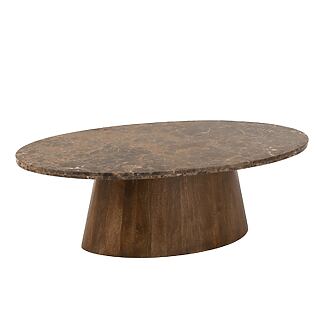
J-Line "Esmeralda" Oval Coffee Table - Marble / Mango Wood - Brown
1.075,00 €
VAT included.
Delivery time: 2-4 working days
-
Anatolian tile necklace with glass cabochon pendant
26,90 €
VAT included.
Delivery time: 4-8 working days
-
Metal wall relief "Tree in a Circle" with shimmering leaves
89,00 €
VAT included.
Delivery time: 3-5 working days
-
Metal wall relief "Shiny Leaves" with a glossy leaf and branch motif
89,00 €
VAT included.
Delivery time: 3-5 working days
-
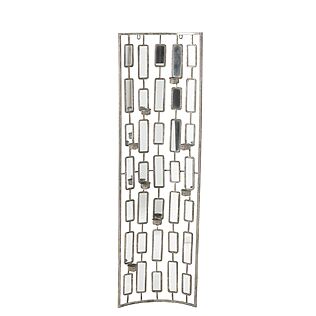
J-Line Elegant wall decoration with mirrors & metal tealight holders, large
129,00 €
VAT included.
Delivery time: 2-4 working days