At the opening, someone holds your business card. Your picture hangs in front of them, and they would have to type in your username. A QR code on your business card saves them that trouble: just scan it with their phone, and their profile opens. Then they can see more of your art than just the single picture on the wall.
If printed incorrectly, the code remains silent. It's too small, too close to the cut, behind reflective glass, or the username inside changes later. This article shows where it belongs, how big it needs to be, and how to check it.
You call a mobile number, but you have to search for a username. A code opens your work instantly, which is what anyone looking at a picture wants. The number and address still remain on the card; the code is added and doesn't replace anything. What matters is what the scan opens. Three options are possible.
What the code opens
Advantage
risk
Suitable for
Profile
Displays all works in one place
A new username invalidates any code
Business card, label, flyer
Post or Reel
Shows exactly one work
This only works as long as the post is online
Invitation, short notice
Own page with redirect
Target can be changed after printing
The domain and website must remain online permanently
Large print runs, catalogues
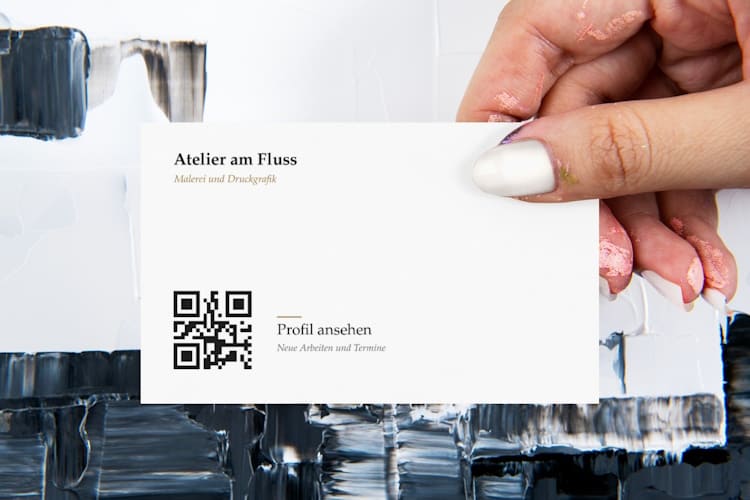
Hand holding the back of a minimalist studio business card with QR code. Image by rawpixel.com, via Freepik
The front of the card should have space for your name, technical details, and contact information. The code belongs on the back, 2 cm including a buffer zone and at least 5 mm from the cut edge. Cards are carried in wallets for extended periods, so the profile or personal page should be prominently displayed. A code that links to a post or reel only lasts as long as that post or reel, and a card should be durable for months.
From username to print file in three steps
Once you've decided on your username, you can create the QR code for Instagram and send it to the printer as an SVG file. Beforehand, it's worth taking a look at the quiet zone, the free margin: According to Denso Wave, the company behind the QR code, every symbol needs a margin of four modules . This margin is included in the overall size. A 2 x 2 cm code will enclose it, and the pattern itself will then measure approximately 1.6 cm. Here's how to proceed:
Set a name. If you change it after printing, any code will be invalid, and the old name could be assigned to someone else.
Generate the code. Place the Instagram history only around the code, as its yellow and orange tones are too bright for the pattern. A brief note next to it, such as "View profile," tells the viewer what the scan opens.
Export the file. Use SVG or PDF for printing and PNG for screen display. The same vector file will generate the code for both the card and the shop window.
Instagram also creates its own QR codes within the app, for profiles as well as for individual posts and Reels. Color and background options are limited, and a pixel-based image is saved. This is usually sufficient for cards and labels, but a vector file is cleaner for posters or shop windows.
Label on the artwork and exhibition sign: The QR code belongs next to the image, not on it
Open studio on a Saturday: A guest stands before an oil painting on the easel, still smelling of turpentine, and wants to see more than the studio can hold. A label next to the easel bears the same code as your card, giving the guest the choice of asking now or scanning it later.
Oil painting on an easel in the studio. Image by DC Studio, via Freepik
On the canvas, the code would disrupt the image, and paint or a photograph behind it would obstruct the free edge. Place it on the artwork label next to the picture, along with the title, technique, and dimensions. If the viewer is standing approximately 30 to 50 cm away, the code requires one-tenth of that distance, i.e., 3 to 5 cm , including a buffer zone.
If the sign is hung on the wall in the gallery, the lighting is fixed, and visitors cannot tilt it. Therefore, have it with a matte finish , as glossy print casts a bright spot in the camera's view. If a larger text panel or room text is read from a distance of 1 meter, the code needs 10 cm of space. Behind a passe-partout or frame, this space is easily lost.
A visitor with her mobile phone in front of pictures in a gallery; next to each work is a small sign. Image by rawpixel.com, via Freepik
If the gallery handles the sale itself, ask beforehand if a code on the sign is acceptable. With their permission, it will remain there, and no one will ask you to replace it later.
QR code on flyers and invitations: back side, size, breathing room
When you pick up a flyer, leave space on the back. A code placed too close to the edge is a common mistake with exhibition flyers. For A6 size and a reading distance of 30 cm, the code needs 3 cm of space, including a buffer zone. Keep it 5 mm from the cut edge and, for folded invitations, 10 mm from the fold; otherwise, the cut will cut off the edge, and the fold will crease the design.
Size and quiet zone at a glance
The rule of thumb is simple: divide the reading distance by ten, but never go below 2 x 2 cm. All measurements include the free margin. The distances for the label and text panel are examples.
If your layout specifies 2 cm, check whether this refers to the code including the border or just the pattern.
carrier
Reading distance
Size of the code including the quiet zone
surface
business card
15 to 20 cm
2 cm
No spot UV varnish, no foil, no embossing on the code, 5 mm to the cut edge
Flyer A6
30 cm
3 cm
Gloss finish possible, 5 mm to the cut edge, 10 mm to the fold
Label on the work
approximately 30 to 50 cm
3 to 5 cm
Matte, flat, next to the picture
Text panel, hall text
approximately 1 m
10 cm
Matte finish, with a free border all around
shop window
2 m
20 cm
Matte finish, watch out for reflections
The business card is the tightest case, as its 85 x 55 mm dimensions leave little room for error. The cutting machine operates with an accuracy of approximately one millimeter. Close to the edge, it can easily cut into the margin, hence the 5 mm margin from the cutting edge. Spot UV varnish, hot foil stamping, and deep embossing on the code can render it illegible, and on absorbent, uncoated paper, 2 cm is the minimum. On a dark card, the code should be placed on a light-colored area.
The edge must remain light and flat. A photo, gradient, or colored area will blur the boundary the scanner is looking for, even if the background appears pale on the screen.
A code in your favorite ochre color looks elegant on screen but looks terrible on uncoated paper. Print the modules in black; the color belongs in the frame around the code.
Print test: How to check the code before 500 cards are printed
A test print costs only one sheet of paper and can save the entire print run. Print the same code at three different distances, approximately 2 cm, 2.5 cm, and 3 cm, on the material used for the print run. Scan from half the planned distance, the planned distance, and twice the distance, using an iPhone and an Android phone.
Repeat the scan in the light of the exhibition room, using a mobile phone that is a few years old, and hold the camera at an angle of about 30 degrees.
Also test on a mobile phone without the Instagram app and in a private browser window, as this is the route new visitors take, and the logged-out view is limited. Print the print run one size larger than the smallest passing grade. Typical errors and their solutions are shown in the table.
Mistake
Caused
Solution
Displays "Page not available"
Username changed or post deleted
Generate new code for the current address; in the future, a separate page will be placed before it
Scans from the screen, but not from the printed card
Code too small, printed too pale, or quiet zone cut off
Print one size larger, modules black, leave margins clear
Too dense, small, illegible
Link from the share menu with appended parameters such as “?igsh=…” or “utm_…”
Delete everything after the question mark and regenerate the code
Registration required
Logged-out view is limited
Post important information on your own page, link to Instagram with a tap of your finger
The second error only becomes apparent during printing, because a screen is more forgiving than paper. Therefore, the test print is crucial, not the preview.
When a QR code is not suitable
There are three cases in which you are better off doing without it:
The destination changes often, and you don't have your own websitewhere you can replace it after printing.
A work of art is sold without contact with you, for example, if the gallery handles the buyers alone.
The code is meant to be applied to the painting itself, where it lacks a calm, bright edge.
A code is an agreement between your paper and the viewer's mobile phone. Where is your next code located, and would it have a free margin there?
Owner and Managing Director of Kunstplaza . Publicist, editor, and passionate blogger in the fields of art, design, and creativity since 2011. Graduated with a degree in web design from university (2008). Further developed creative techniques through courses in freehand drawing, expressive painting, and theatre/acting. Profound knowledge of the art market gained through years of journalistic research and numerous collaborations with key players and institutions in the arts and culture sector.
We use technologies such as cookies to store and/or access device information. We do this to improve your browsing experience and to display (non-)personalized advertising. If you consent to these technologies, we can process data such as browsing behavior or unique IDs on this website. Refusal or withdrawal of consent may adversely affect certain features and functions.
Functional
Always Active
Technical storage or access is strictly necessary for the legitimate purpose of enabling the use of a specific service expressly requested by the subscriber or user, or for the sole purpose of carrying out the transmission of a message over an electronic communications network.
Preferences
The technical storage or access is necessary for the legitimate purpose of storing preferences that were not requested by the subscriber or user.
statistics
Technical storage or access that is solely for statistical purposes.Technical storage or access that is used solely for anonymous statistical purposes. Without a subpoena, the voluntary consent of your internet service provider, or additional recording by third parties, the information stored or retrieved for this purpose cannot generally be used to identify you.
marketing
Technical storage or access is required to create user profiles, to send advertising, or to track the user on one or more websites for similar marketing purposes.










 Modern table "Puntual" in black grid design with aluminum tabletop
398,00 €
Modern table "Puntual" in black grid design with aluminum tabletop
398,00 €